 Whatlater
Automations: the expense sheet that fills itself
Everyone has a system for receipts, and every system dies the same way: a shoebox, a folder of photos, a spreadsheet you swear you'll update on Sunday. The problem was never discipline — it's that filing is a second job.
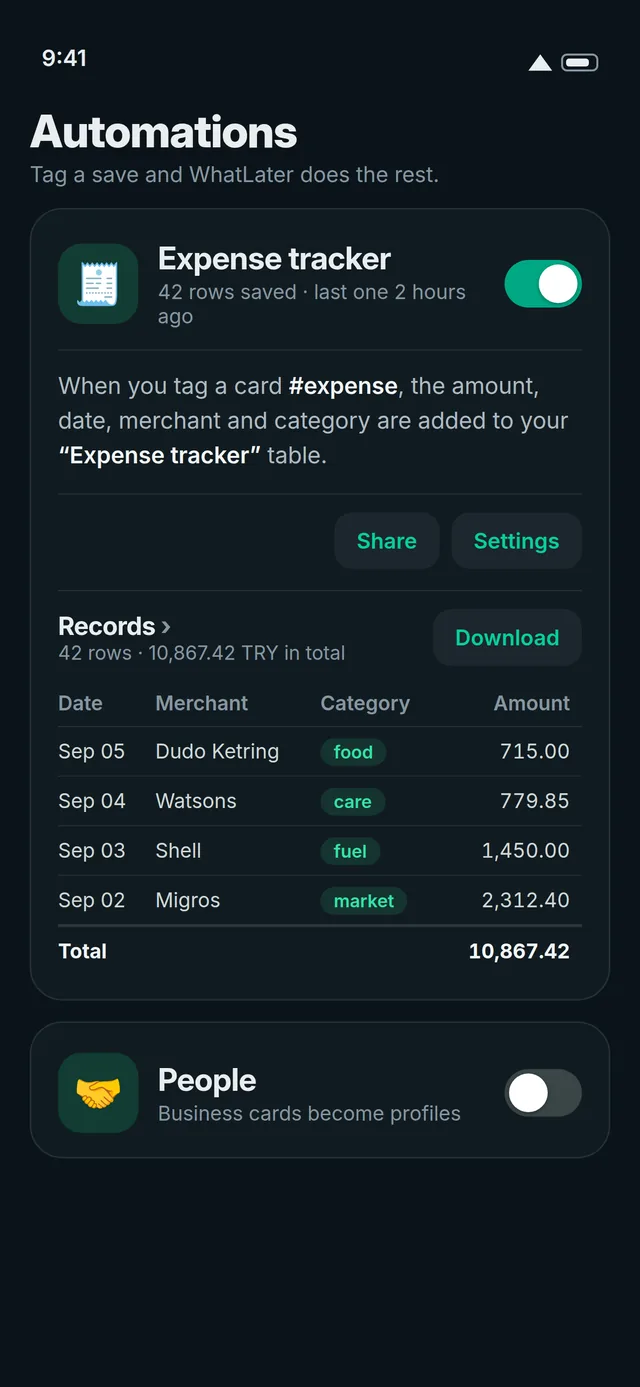
With WhatLater the filing happens at the moment you already act: you photograph the receipt and send it to WhatLater on WhatsApp. An automation reads it — amount, currency, date, merchant, category — and appends a row to your expense table. You did one thing; the sheet did the rest.
Starting takes one tap
Open Automations in the app or the web hub and enable the prebuilt Expense tracker. From then on, anything you tag #expense — a receipt photo, a forwarded e-invoice PDF, even a voice note saying "forty-six twenty at the market" — lands in the table. There are prebuilts for meal logs, book lists and people you meet, too.
Or describe your own, in a sentence
The composer takes plain words: "Log every receipt photo to my expense table with amount, date and category." WhatLater compiles it into a rule — you see the columns it chose before anything runs. Rules can watch a tag, a kind of save (every photo, every voice note), or a source.
It reports back — and you stay in charge
Tables aren't a place your data goes to hide. Download any table as Excel, CSV or PDF. At the end of the month, the automation can message you the totaled sheet on WhatsApp. And if the AI misreads a scribbled total, click the cell and fix it — every field is editable in place.
The quiet magic is the direction of effort: you never "do bookkeeping." You just keep living in WhatsApp, and the books keep themselves.